Showing posts with label Integration Concepts. Show all posts

Monday, October 22, 2018

Salesforce Integration with Facebook

Create a connected app in facebook, it will generate clientid, clientsecret, redirecturi:

We are using client_credentials in facebook, so we are not requesting code first and then acces_token, directly we are requesting for access_token.


 Storing these values in custom object:
Requesting for acces token from facebook:

Visaulforce Homepage:
<apex:page controller="Rest_OAuth_Facebook">
    <apex:form >
       <apex:commandButton value="gettoken" action="{!requestToken}"/>
    </apex:form>
</apex:page>

Apex Class:
public class Rest_OAuth_Facebook {
    public string accesstoken {set; get;}
    public Serverdata__c data {set; get;}
    public Rest_OAuth_Facebook(){
        data = [select Client_ID__c, Client_Secret__c, Redirect_URL__c from Serverdata__c where Name = 'Facebook'];
    }
    public void readcode(){
            accesstoken=Apexpages.currentPage().getparameters().get('access_token');   
        }
    public PageReference requestToken(){
        string endpoint='https://graph.facebook.com/oauth/access_token?';
        endpoint=endpoint+'client_id='+ data.Client_ID__c;
        endpoint=endpoint+'&client_secret='+data.Client_Secret__c;
        endpoint=endpoint+'&redirect_uri='+data.Redirect_URL__c;
        endpoint=endpoint+'&grant_type=client_credentials';
        PageReference p = new PageReference(endpoint);
        return p;
    } 
}

Visualforce Response Page:

<apex:page controller="Rest_OAuth_Facebook">
    {!accesstoken}
</apex:page>

By using this access_token we can request other resources from facebook.

Salesforce Integration with Linkedin

1. Create developer account in linkedin Account.
2. Create connected application in linkedin 
3. develop the code in salesforce environment
     i) create a custom object to store the token information
     ii) add remote site settings
     iii) test the integration


Create developer account in linkedin Account:
Type https://developer.linkedin.com in URL and click enter you will redirect to below page


Note: Create a visualforce page for redirect URI and save in connected app like https://munna550-dev-ed--c.ap5.visual.force.com/apex/LinkedinResponse

<apex:page controller="Rest_OAuth_LinkedIN" action="{!readcode}">
    {!code}
</apex:page>

Creating a custom object in salesforce and clientID, clientsecret and redirect uri in that object as shown below.


Request for code from Linkedin:
public class Rest_OAuth_LinkedIN {
    public string accestoken {set; get;}
    public string code {set; get;}
    public Serverdata__c data {set; get;}
    public Rest_OAuth_LinkedIN(){
        data = [select Client_ID__c, Client_Secret__c, Redirect_URL__c from Serverdata__c where Name = 'LinkedIN'];
    }
    /* Request for code
     * endpoint url  : https://www.linkedin.com/oauth/v2/authorization
     * Method        : GET
     * parameters    : response_type = code
     *               : client_id = connected app clientid
     *               : redirect_uri = connected app redirecturi
     *               : state = any random string
     */
   public void readcode(){
            code=Apexpages.currentPage().getparameters().get('code');   
        }
    public PageReference requestcode(){
        string endpoint='https://www.linkedin.com/oauth/v2/authorization?';
        endpoint=endpoint+'response_type=code';
        endpoint=endpoint+'&client_id='+data.Client_ID__c;
        endpoint=endpoint+'&redirect_uri='+data.Redirect_URL__c;
        endpoint=endpoint+'&state=shaik';
        PageReference p = new PageReference(endpoint);
        return p;
    }
}

Create a visualforce home page to send a request through button to linkedin, we will get code as shown below:

<apex:page controller="Rest_OAuth_LinkedIN">
    <apex:form>
       <apex:commandButton value="code" action="{!requestcode}"/>
    </apex:form>
</apex:page>


Request for Access Token:
public class Rest_OAuth_LinkedIN {
    public string accesstoken {set; get;}
    public string code {set; get;}
    public Serverdata__c data {set; get;}
    public Rest_OAuth_LinkedIN(){
        data = [select Client_ID__c, Client_Secret__c, Redirect_URL__c from Serverdata__c where Name = 'LinkedIN'];
    }
    /* Request for code
     * endpoint url  : https://www.linkedin.com/oauth/v2/authorization
     * Method        : GET
     * parameters    : response_type = code
     *               : client_id = connected app clientid
     *               : redirect_uri = connected app redirecturi
     *               : state = any random string
     */
    public void readcode(){
            code=Apexpages.currentPage().getparameters().get('code');   
        }
    public PageReference requestcode(){
        string endpoint='https://www.linkedin.com/oauth/v2/authorization?';
        endpoint=endpoint+'response_type=code';
        endpoint=endpoint+'&client_id='+data.Client_ID__c;
        endpoint=endpoint+'&redirect_uri='+data.Redirect_URL__c;
        endpoint=endpoint+'&state=shaik';
        PageReference p = new PageReference(endpoint);
        return p;
    }
    /* Request for acesstoken
     * endpoint url  : https://www.linkedin.com/oauth/v2/accessToken
     * Method        : POST
     * Parameters    : grant_type=authorization_code
     *               : code=The authorization code you received from above
     *               : redirect_uri = from connected app
     *               : client_id = from connected app
     *               : client_secret = from connected app
     */
    public void requestToken(){
        string endpoint='https://www.linkedin.com/oauth/v2/accessToken';
        string body='grant_type=authorization_code';
        body=body+'&code='+code;
        body=body+'&redirect_uri='+data.Redirect_URL__c;
        body=body+'&client_id='+data.Client_ID__c;
        body=body+'&client_secret='+data.Client_Secret__c;
        Http p = new Http();
        HttpRequest request = new HttpRequest();
        request.setEndpoint(endpoint);
        request.setMethod('POST');
        request.setBody(body);
        HttpResponse response = p.send(request);
        string result = response.getBody();
        System.JSONParser JP = JSON.createParser(result);
        while(JP.nextToken()!=NUll){
            if(JP.getText()=='access_token'){
                JP.nextToken();
                accesstoken = JP.getText();
            }
        }
    }
 }

<apex:page controller="Rest_OAuth_LinkedIN" action="{!readcode}">
    {!code}
    <apex:form>
       <apex:commandButton value="gettoken" action="{!requestToken}"/>
    </apex:form>
    {!accesstoken}
</apex:page>


Once we get access token, we supposed to get the details of the profile from LinkedIN:
public class Rest_OAuth_LinkedIN {
    public string accesstoken {set; get;}
    public string code {set; get;}
    public string result {set; get;}
    public Serverdata__c data {set; get;}
    public Rest_OAuth_LinkedIN(){
        data = [select Client_ID__c, Client_Secret__c, Redirect_URL__c from Serverdata__c where Name = 'LinkedIN'];
    }
    /* Request for code
     * endpoint url  : https://www.linkedin.com/oauth/v2/authorization
     * Method        : GET
     * parameters    : response_type = code
     *               : client_id = connected app clientid
     *               : redirect_uri = connected app redirecturi
     *               : state = any random string
     */
    public void readcode(){
            code=Apexpages.currentPage().getparameters().get('code');   
        }
    public PageReference requestcode(){
        string endpoint='https://www.linkedin.com/oauth/v2/authorization?';
        endpoint=endpoint+'response_type=code';
        endpoint=endpoint+'&client_id='+data.Client_ID__c;
        endpoint=endpoint+'&redirect_uri='+data.Redirect_URL__c;
        endpoint=endpoint+'&state=shaik';
        PageReference p = new PageReference(endpoint);
        return p;
    }
    /* Request for acesstoken
     * endpoint url  : https://www.linkedin.com/oauth/v2/accessToken
     * Method        : POST
     * Parameters    : grant_type=authorization_code
     *               : code=The authorization code you received from above
     *               : redirect_uri = from connected app
     *               : client_id = from connected app
     *               : client_secret = from connected app
     */
    public void requestToken(){
        string endpoint='https://www.linkedin.com/oauth/v2/accessToken';
        string body='grant_type=authorization_code';
        body=body+'&code='+code;
        body=body+'&redirect_uri='+data.Redirect_URL__c;
        body=body+'&client_id='+data.Client_ID__c;
        body=body+'&client_secret='+data.Client_Secret__c;
        Http p = new Http();
        HttpRequest request = new HttpRequest();
        request.setEndpoint(endpoint);
        request.setMethod('POST');
        request.setBody(body);
        HttpResponse response = p.send(request);
        string result = response.getBody();
        System.JSONParser JP = JSON.createParser(result);
        while(JP.nextToken()!=NUll){
            if(JP.getText()=='access_token'){
                JP.nextToken();
                accesstoken = JP.getText();
            }
        }
        getprofile();
    }
    public void getprofile(){
        string endpoint = 'https://api.linkedin.com/vi/people/~?format=json';
        Http p = new Http();
        HttpRequest request = new HttpRequest();
        request.setEndpoint(endpoint);
        request.setMethod('GET');
        request.setHeader('Authorization','Bearer '+ accesstoken);
        HttpResponse response = p.send(request);
        result = response.getBody();
    }
 }

<apex:page controller="Rest_OAuth_LinkedIN" action="{!readcode}">
    {!code}
    <apex:form>
       <apex:commandButton value="gettoken" action="{!requestToken}"/>
    </apex:form>
    {!result}
</apex:page>


Sunday, October 21, 2018

Salesforce Integration with BOX

This Post will help you to integrate with BOX application and creating folders and storing files in BOX.
Note: We need to register an account in BOX.

Steps for integrate ssalesforce with BOX:
-> Here we are assuming salesforce as a service consumer and BOX as a service provider.

Step 1: we need to create an application(connected app) in Box.com, for this we need to go www.developer.box.com.

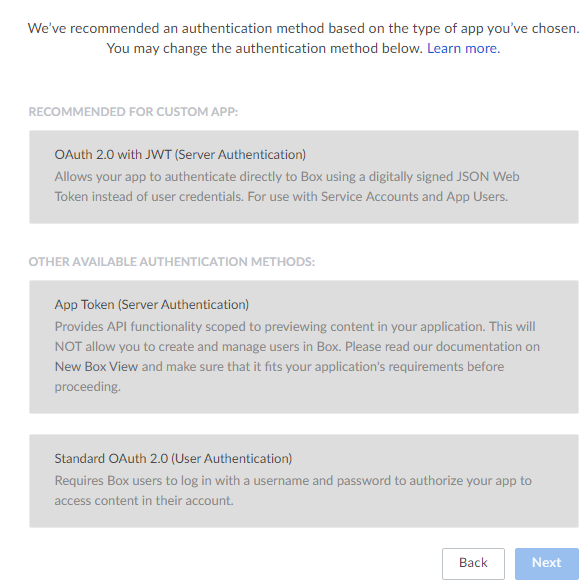
Always we have to create a connected app in service provider. So to create a connected app, click on create new app -> click on custom app -> click on next.
We are creating the user authentication, which requires username and password to log into the box for users. so choose standard OAuth 2.0 (user authentication) and click on next.

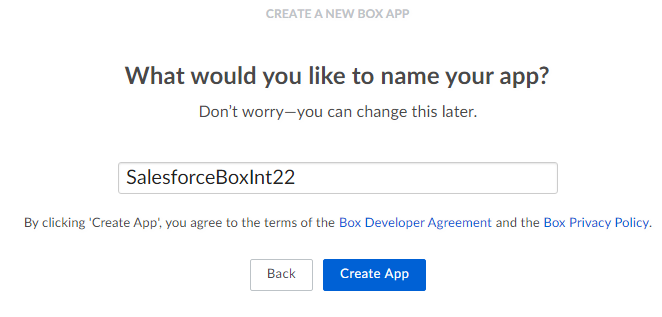
Give an Unique App name and click on create app.


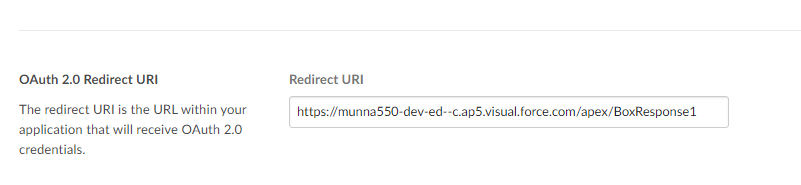
The moment we get created we will get client ID, client Secret, and Redirect URI as shown below.

https://account.box.com/api/oauth2/authorize is the URL of the Box login page. To begin the process of authenticating and authorizing an application to work with the Box APIs, send an HTTP request like the following:

Step 2: Create a visualforce page to get the response of BOX.
So that we will give this page in redirect URI in BOX application as shown below.

Step 3: Store Client ID, Client Secret and Redirect URI in a custom object.

Step 4: Send a request to BOX.com to get a response like authorization code, for this we need to give parameters like

https://account.box.com/api/oauth2/authorize?response_type=code&client_id=<MY_CLIENT_ID>

&redirect_uri=<MY_REDIRECT_URL>&state=<MY_SECURITY_TOKEN>

i) EndPoint URI, ii) Client ID, iii) Response_Type, iv) State.


public class Rest_OAuth_Box { public string code {set; get;} public string accesstoken {set; get;} public Serverdata__c data {set; get;} public Rest_OAuth_Box(){ data = [select Client_ID__c, Client_Secret__c, Redirect_URL__c from Serverdata__c where Name = 'BOX']; } /* Request the code from Box * Endpoint URL : https://account.box.com/api/oauth2/authorize * Method : GET * Parameters : response_Type = code * : client_ID * : redirect_url = callback url registered with box * : state = any random string */ public PageReference requestcode(){ string endpoint='https://account.box.com/api/oauth2/authorize?response_type=code&'; endpoint=endpoint+'client_id='+ data.Client_ID__c; endpoint=endpoint+'&redirect_uri='+data.Redirect_URL__c; endpoint=endpoint+'&state=nitajshaik'; PageReference p = new PageReference(endpoint); return p; } public void readcode(){ code=Apexpages.currentPage().getparameters().get('code'); }
}


Step 5: As we trying to make a request to third party system, we have to register the third party system url
in remote site settings.


Step 6: Create a visualforce page for getting the response of code into that page.

<apex:page controller="Rest_OAuth_Box"> <apex:form> <apex:commandButton value="code" action="{!requestcode}"/> </apex:form> </apex:page>
execute this we will get CODE as show below.

Step 7: Send a reuqest for access token from BOX, with the help of the CODE get from above.

public class Rest_OAuth_Box { public string code {set; get;} public string accesstoken {set; get;} public Serverdata__c data {set; get;} public Rest_OAuth_Box(){ data = [select Client_ID__c, Client_Secret__c, Redirect_URL__c from Serverdata__c where Name = 'BOX']; } /* Request the code from Box * Endpoint URL : https://account.box.com/api/oauth2/authorize * Method : GET * Parameters : response_Type = code * : client_ID = connected app clientid * : redirect_url = callback url registered with box * : state = any random string */ public PageReference requestcode(){ string endpoint='https://account.box.com/api/oauth2/authorize?response_type=code&'; endpoint=endpoint+'client_id='+ data.Client_ID__c; endpoint=endpoint+'&redirect_uri='+data.Redirect_URL__c; endpoint=endpoint+'&state=nitajshaik'; PageReference p = new PageReference(endpoint); return p; } public void readcode(){ code=Apexpages.currentPage().getparameters().get('code'); } /* Request access token from BOX * End Point URL : https://api.box.com/oauth2/token * Method : POST * Parameters : grant_type = authorization_code * : code = fetched in the above step * : client_ID = connected app clientid * : client_secret = connected app clientsecret */ public void requestToken(){ string url = 'https://api.box.com/oauth2/token'; string body = 'grant_type=authorization_code&'; body = body+'code='+ code; body = body+'&client_id='+ data.Client_ID__c; body = body+'&client_secret='+ data.Client_Secret__c; Http p = new http(); HttpRequest request = new HttpRequest(); request.setEndpoint(url); request.setMethod('POST'); request.setBody(body); HttpResponse response = p.send(request); String result = response.getBody(); System.JSONParser JP = JSON.createParser(result); while(JP.nextToken()!=Null){ if(JP.getText()=='access_token'){ JP.nextToken(); accesstoken = JP.getText(); } } } }

Step 8: Create response visualforce page to get the access token on page.


<apex:page controller="Rest_OAuth_Box" action="{!readcode}"> {!code} <apex:form > <apex:commandButton value="gettoken" action="{!requestToken}"/> {!accessToken} </apex:form> </apex:page>

After executng we will get accesstoken as shown below:


Step 9: Creating a folder in BOX
public class Rest_OAuth_Box { public string code {set; get;} public string result {set; get;} public string accesstoken {set; get;} public Serverdata__c data {set; get;} public Rest_OAuth_Box(){ data = [select Client_ID__c, Client_Secret__c, Redirect_URL__c from Serverdata__c where Name = 'BOX']; } /* Request the code from Box * Endpoint URL : https://account.box.com/api/oauth2/authorize * Method : GET * Parameters : response_Type = code * : client_ID = connected app clientid * : redirect_url = callback url registered with box * : state = any random string */ public PageReference requestcode(){ string endpoint='https://account.box.com/api/oauth2/authorize?response_type=code&'; endpoint=endpoint+'client_id='+ data.Client_ID__c; endpoint=endpoint+'&redirect_uri='+data.Redirect_URL__c; endpoint=endpoint+'&state=nitajshaik'; PageReference p = new PageReference(endpoint); return p; } public void readcode(){ code=Apexpages.currentPage().getparameters().get('code'); } /* Request access token from BOX * End Point URL : https://api.box.com/oauth2/token * Method : POST * Parameters : grant_type = authorization_code * : code = fetched in the above step * : client_ID = connected app clientid * : client_secret = connected app clientsecret */ public void requestToken(){ string url = 'https://api.box.com/oauth2/token'; string body = 'grant_type=authorization_code&'; body = body+'code='+ code; body = body+'&client_id='+ data.Client_ID__c; body = body+'&client_secret='+ data.Client_Secret__c; Http p = new http(); HttpRequest request = new HttpRequest(); request.setEndpoint(url); request.setMethod('POST'); request.setBody(body); HttpResponse response = p.send(request); String result = response.getBody(); System.JSONParser JP = JSON.createParser(result); while(JP.nextToken()!=Null){ if(JP.getText()=='access_token'){ JP.nextToken(); accesstoken = JP.getText(); } } create(); } /* Create a folder in box * endpoint : https://api.box.com/2.0/folders * Authorization : Bearer ACCESS_TOKEN" * Body : name, parent{"name":"New Folder", "parent": {"id": "0"}}' * Method : POST */ public void create(){ string endpoint = 'https://api.box.com/2.0/folders'; string body = '{"name":"Nitaj", "parent": {"id": "0"}}'; Http p = new Http(); HttpRequest request = new HttpRequest(); request.setEndpoint(endpoint); request.setMethod('POST'); request.setHeader('Authorization','Bearer '+ accesstoken); request.setBody(body); HttpResponse response = p.send(request); result = response.getBody(); } }


<apex:page controller="Rest_OAuth_Box" action="{!readcode}">
    {!code}
    <apex:form >
        <apex:commandButton value="gettoken" action="{!requestToken}"/>
        {!result}
    </apex:form>
</apex:page>


Step 10: Deleting a folder in BOX

public void deletefolder(){ string endpoint = 'https://api.box.com/2.0/folders/56198983784'; Http p = new Http(); HttpRequest request = new HttpRequest(); request.setEndpoint(endpoint); request.setMethod('DELETE'); HttpResponse response = p.send(request); result = response.getBody(); }